
ProEventsWP vs EventON
EventON and ProEventsWP both display events on a WordPress site. EventON offers ready-made tiles that can open event details inside the calendar. ProEventsWP uses the native WordPress Query Loop for its event feeds, so editors can build their own grids and lists with the same blocks they use elsewhere on the site.
EventON’s tiles make sense for a festival that wants an interactive programme it can publish quickly. ProEventsWP gives a venue more control when its homepage and events page need different layouts for the same schedule.
Written by ProEventsWP · Reviewed 11 November 2026

Features at a glance
| Feature | ProEventsWP | EventON |
|---|---|---|
| Calendar layouts | 6 views in Free | Tiles, lists and schedules in Lite |
| Month grid | Included in Free | Paid Full Cal add-on for Full |
| WordPress editing | Editable calendar blocks | Prepared layouts and embeds |
| Recurring events | Included in Free | Included in Lite |
| RSVPs or free signups | Individual RSVPs in Free | Full and RSVP Events add-on |
| Paid ticket sales | Unavailable | Full and Event Tickets add-on |
ProEventsWP Free includes Month, Week, Day, List, Photo and Map.
Designing an event grid in WordPress
In EventON Lite’s demo, visitors can scan a grid of image tiles and click an event to open its details. Editors can pick a tile style and decide how it opens. That is useful when a prepared design already suits the site.
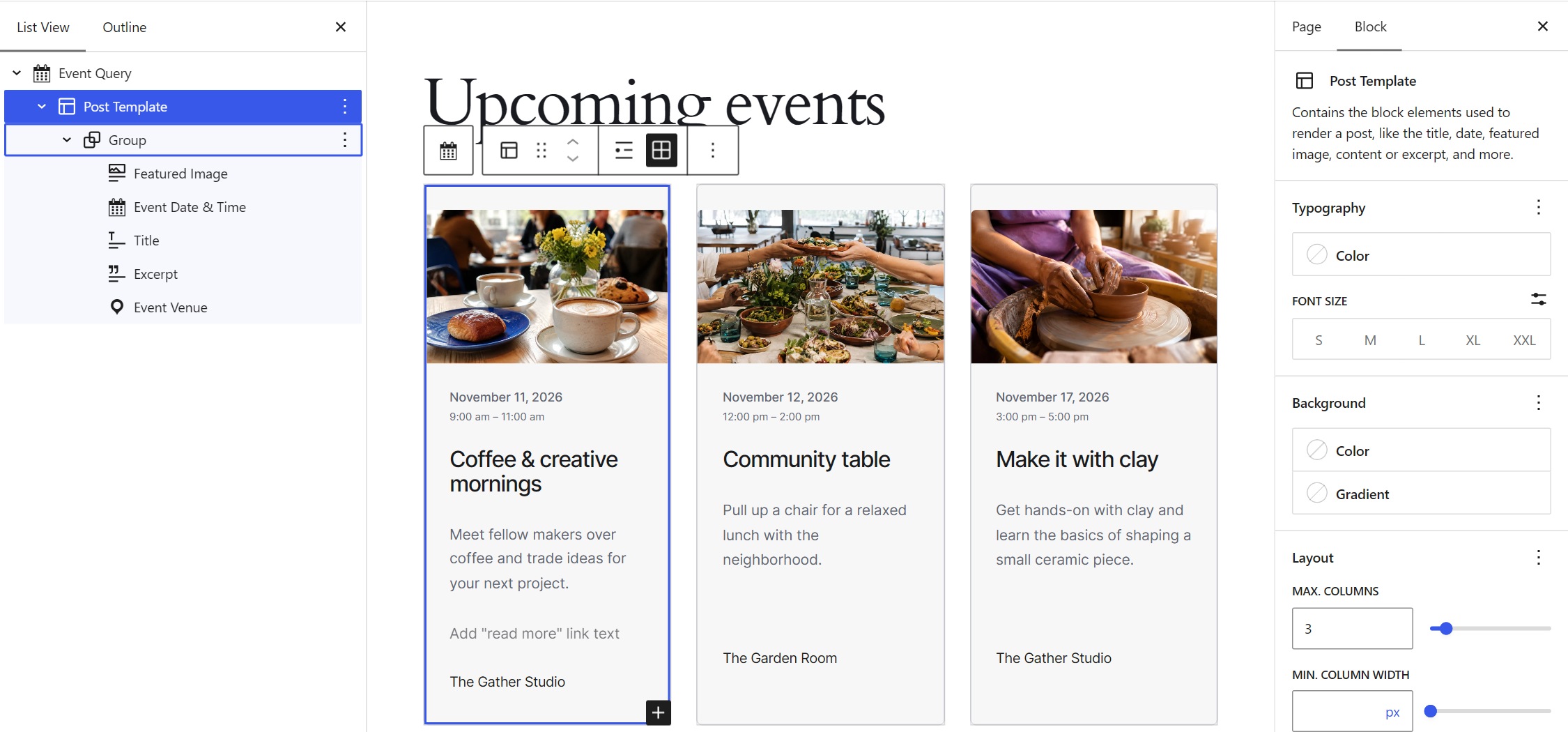
In ProEventsWP, Event Query is a version of the WordPress Query Loop that pulls in events. Its Post Template is the layout that repeats for each event. Editors can set the number of grid columns and arrange native blocks such as Featured Image, Title and Excerpt alongside event-specific blocks for the date or venue. A change to the template updates every card in that feed.
A venue can feature a photo grid on its homepage and use a compact list with dates and venues on its programme page. Both can pull from the same events and have their own layouts.
Free layouts and paid extensions
EventON Lite already includes tiles, lists and repeating events. The traditional calendar with a cell for each date is a separate design called Full Cal, which requires EventON Full and the paid add-on. ProEventsWP includes its Month grid alongside the Photo and List views in Free.
EventON’s RSVP Events and Event Tickets add-ons serve different needs. RSVP Events can ask how many people are coming. Event Tickets sells admission through WooCommerce. Both require EventON Full. ProEventsWP includes individual RSVPs and does not sell tickets.
What does it cost?
| Price | ProEventsWP | EventON |
|---|---|---|
| Free | $0 Unlimited sites | $0 EventON Lite, including image tiles |
| Paid plans | $59/year Personal · 1 site | $60 once EventON Full · 1 site |
| Other plans | $129/year Studio · 5 sites $249/year Agency · Unlimited sites | — |
| Add-ons | — | $55/year Full Cal · 1 site $100/year RSVP Events · 1 site $120/year Event Tickets · 1 site |
For one site, EventON Lite already covers a visual gallery. At the individual list prices, Full plus Full Cal costs $115 in the first year and $55 per year to renew the add-on. Full plus RSVP Events costs $160 in the first year, then $100 per year for that add-on. Full plus Event Tickets costs $180 in the first year, then $120 per year for the add-on. These are separate setups. WooCommerce payment processing fees can apply to ticket sales.
Month views, side by side


Sources
ProEventsWP Free · ProEventsWP pricing · EventON Lite and Full features · EventON Lite tiles demo · Calendar display types · EventON Full pricing · Full Cal · RSVP Events · WooCommerce ticketing
Which plugin fits your site?
EventON is a good fit if its interactive tiles already look and behave the way you want, or if you need its ticketing extensions. ProEventsWP makes sense if your team wants to build its own event grids and lists with WordPress blocks and also needs a month calendar and simple RSVPs. If selling tickets matters, budget for EventON’s ticketing setup or another dedicated tool.